Mar 11, 2009

Situation Based Learning Design

Situation-Based Learning Design: Research Insights for Enhanced Remembering and Performance
Will Thalheimer, willatworklearning.com

It's just about standing room only in Will's session. Glad I came early and swiped a chair next to a power outlet. These seats are scarce!

It's important to create metaphors that are understandable by "real people".

This session is to share the evolution of the concept of "situation-based learning".

Goal for eLearning designer:
  • get learners to act differerntly
  • to perform far-reaching tasks
  • to retrieve the information they need to apply what was learned
How we Learn / Encode
  • an environmental cue can trigger a memory
  • our mind searches the information
  • from rehearsal, we apply the knowledge
If learners don't access the information (application need) soon enough after training, it becomes difficult to impossible to retrieve.

Retrieval = Learning - Forgetting + Spontaneous Remembering.
Don't forget the forgetting factor. Include opportunities for learners to retrieve the information in regular intervals otherwise the learning is lost.

Situation-based learning begins with the magic question: "What do we want out learners to be able to do and in what situations do we want our learners to do those things?"

SEDA - Real-world application process to situation-based learning
  1. Situation
  2. Evaluation
  3. Decide
  4. Action
Having a goal by itself is not enough to perform an action. If you have an intention, then the action is more likely to take place.

The problem is presenting concepts without providing practice. This turns into a test of memorization. Or provide decisions with no actions. Or provide inadequate evaluations of situations. Or offer a decision without proving the proper situation to apply. All bad and doesn't provide adequate results.

All steps must be followed through to allow the learner to retrieve the knowedlge at the appropriate time.

We absorb more than just the learning message. It's the learning message and background stimuli (noise, sights, smells, emotions, etc.). When it comes down to retrieving the information, memories of background stimuli can also trigger the retreival event. Multiple cues (triggers) improve the retreival results.

A practical example: you're in the kitchen and remember to get something out of the living room. You go to the living room and forget want you needed. So you go back to the kitchen and remember what you needed in the living room. Your background stimulus (location) triggered the memory.

Move from topic-based to situation-based design. By aligning the situational cues to real-world events, the retrieval is more effective.

Summary
  • By aligning contexts, we can create spontaneous remembering
  • Start designing differently - based on what learners should DO and not KNOW
  • Benefits = more remembering, better results

ID Zone: Is Rapid e-Learning a Myth?

Tom Kuhlmann, Articulate
Author of the Rapid E-Learning Blog

Finally, after reading his blog for months, I get to put a face to a name!

Rapid isn't a myth, it 's a reality. Its' not PPT to Flash. (Bad PPT = bad e-learning). Rapid eLearning is the allowing the software to automate the production process for you.

It's not how great your tools are, is how great you're getting the information to the learner.

10 (really 4) you need to know about e-learning:
  1. Types of authoring tools
    Form based
    Freeform
    Screencast
  2. You are the bridge between the client and the learner
    You need to create that environment that will help the learner actually learn.
  3. Make rapid elearning your default position
    Start thinking that that's the approach you'll take. Then as the needs presents itself, look for hybrid, then custom solutions. Save your Flash designers' skill sets (and budgets) for more complex, challenging projects.
  4. There's more to it than the course
Check out some examples:
  • CPR Demo
    Learner has the option to get info linearly, or jump into the activity.
  • JustLeapIn.com
    3D Virtual reality tool that can be imported into PPT for a more engaging exprience
  • Tinychat
    Embed a chat room to allow learners (or maybe even a SME) to interact real time Creates sort of a blended-learning environment
You can include interactive development, despite the limitaitons you might have with the tools you have.

AG09 - Keynote Speaker


Jeff Howe, Wired Magazine

Crowdsourcing: Why the power of the crowd is drivin the future of business

Jeff's video explanation of Crowdsourcing:
The internet created a virtual crowd that comes together through shared interests. When a company takes a job that was once performed by employees and changes it to an open call, undefined position to the general public. Photography is an example. Digital SLR, Photoshop & the Internet make amateur photographers now providig their work to stock photo sites. These groups come up as organicaly by people formally know as customers. Online communities are the building block of crowdsourcing. Shows that people can come together and create organized units.

The Warped Tour grabbed his interest on how the participants have a creative relationship with the tools to create their art. The art isn't about the technology but how the 'kids' used it to seemlessly create thir own works. It's not about content. It's about everyone having a changed relationship with their products. There is a blurring of the lines of producer and consumer.

Example: Threadless.com. User created designs for t-shirts. Then, users can vote on t-shirt designs. The tasks are things that can happen in 30 seconds. Revenue exploded. What started as an idea to please their designer friends, the site creators are now 'doing very well for themselves." What does the crowd do for Treadless?
  • gives cheep labor by creating the designs
  • designers become pseudo-famous because their designs are everywhere
  • marketing & advertising (Threadless Street Team) Threadless never spent $ on an advertising budget becaues their users do all the free advertising.
  • instant metrics for consumer demand

Example: iStockphoto.com. User genereated photos for general use. Pay by credits, not by photo. Created to benefit the community. Photographers have a place to publish their work. Designers have a place to purchase cheep photos.

Cardinal Rule of Crowdsourcing:
Ask not what your community can do for you -- ask what you can do for your community.

... left early to attend ID Zone.

Mar 10, 2009

Designing Scenario-based eLearning

Today was the first day of the eLearning Guild's Annual Gathering 2009. I took the Designing Scenario-based eLearning certificate program.

Tom Eucker, a colleague of Ruth Clark started off talking about his experience, then brought up this statistic:
The US spent $134 Billion on training in 2007! (ASTD: 2008 report) Most of that (62.2%) is salaries, development, admin, etc. Classroom training has been leading the charge, but technology is rapidly gaining ground. Most of the technology has been self-study. But classroom will never go away. There's always the human element that people like to be around other people to get their perspective. Most relevant in complex and deep topics.

Info
  • Inform: to present information
  • Perform: to build skills
    • near transfer - the training is similar to real life; precedural; routine tasks
    • far transfer - learn a generic ability, but it can be applied to different situations; strategic skills; problem solving
Scenario-based learning is geared for far transfer learning.
There is a shift happening from near-transfer to far-transfer situations. Routine tasks are being done by machines. Workers are being asked to do more problem-solving, troubleshooting tasks.

Three course architectures:
  1. Receptive
    • sit back and absorb
    • lecture; video documentary
    • best to inform learners.
    • appropriate for anyone
  2. Directive
    • bottom up; short lessons
    • rule/example/practice + feedback
    • most software training is directive
    • best for near-transfer goals
    • appropriate for novices
  3. Guided Discovery
    • problem-centered
    • inductive approach
    • scenario-based learning
    • best for far-transfer goals
    • best for learners who have some prior knowledge


Three views of learning
  1. Transmisssion
    • absorbtion teaching view
    • Receptive
  2. Behavioral
    • instructive teaching view (provide examples & drill)
    • directive
  3. Knowledge construction
    • inductive teaching view
    • guided discovery
    • provide learners with the skill to create their own connections in their head so they can recreate the correct response later on.


Three levels of knowledge:
  • explicit (stuff you can read in a book, take a class, etc)
  • implicit (learn by doing; the experts know the problems that novices won't know. Basis for scenario based learning)
  • tacit (subconscionous knowledge where the person doesn't know how he knows)
SBL & Architectures
  • Directive
    • Guidelines -> examples -> scenario
  • Guided discovery
    • scenario -> derive guilelines


Experiential Learning
  1. Experience (provide examples) [inductive approach: 1+2] SBL
  2. Process (develop rules)
  3. Generalize (create rules & examples) [deductive approach: 3+4]
  4. Apply (do it)
SBL Synonyms
  • problem based
  • goal based
  • scenario based
  • cognative apprenticeships
  • games / simulations
  • cased based
  • experiential
  • challenge based
  • role play
  • interactive storytelling


Key Features of SBL
  • evident problem / trigger event / job assignment
  • lessons provide case/background information
  • manage flounder (of content, not technology) with guidance (let them go down the wrong track for only a short time)
  • access to knowledge and skills (experts, consultants)
  • feedback provided
    • intrinsic - the result of decision making built into the scenario
    • instructional - popup text to work the scenario
  • time compression
  • mistakes are ok - you learn more from the mistakes you make rather than the successes you achieve.
  • holistic vs. linear (choose your own adventure)
  • inductive vs. instructive
  • opportunities for reflection
Design Features (posted separately at tinyurl.com/ag09-p1 )
  1. Begin with an authentic job problem
    1. job specific
    2. linkd to learnign objectives
    3. designed at the right level of complexity
    4. incorporates procedure, knowledge and starategic elements of the job
  2. provide acces to case related info
    1. job realistic
    2. easy to find and access
    3. reflect normal job sources
    4. linked to case objectives
  3. manage flounder factor
    1. closed (more guidance) vs. open (many choices) design
    2. simple to complex problems (give them feeling of success to start)
    3. provide guidance
      1. instructor
      2. collaborative groups
      3. model solutions
      4. worksheets
      5. pedagogical agents
  4. provide access to knowledge and skills
    1. traditional tutorials
    2. online experts
    3. links to docs and presentations
    4. examples and models of best practices
    5. email to instructor/coach (to get to the tacit knowledge that can't come from the training)
  5. plan scenario feedback
    1. peer comparisons
    2. model answers
    3. intrinsic-consequential
    4. instructional
    5. expert review & comments
Differences between text, video and animation in learning
  • Animation / Video returned higher test scores in application test and their satisfaction
  • so long as the animation/video has a distinct purpose.
THere's a balance to the complexity of a SBL
  • narrow scope / broad scope
  • directive architecture / guided discovery
  • problems as a trigger to thinking / problems as enging
  • low-end media (text/graphics) / video; animations
  • behaviorial task analysis / cognitive task analysis
  • branched scenarios / open simulation
  • defined outcomes / variable outcomes
  • instructor lead training / e-learning
Design Plan for SBL
  1. task deliverable (learning objective)
    1. what is the desired final outcome
  2. trigger event
    1. what initiates the problem? What's the storyline to start it?
  3. case data (givens)
    1. what kind of data will be provided
    2. where is it located
  4. feedback
    1. intrinsic
    2. instructional
  5. reflection opportunity
    1. process comparison
    2. rationally comparison
    3. feedback - replay
Program Design
  • Branched scenario
    • closed design (fixed set of decisions and responses)
    • choose your own adventure
    • good for linear scenarios
  • MEnu
    • list (navigation) of all elements available to the learner
    • non-linear
  • Full simulation
    • open design
    • sequence doesn't matter
    • simulation engine determines situations and outcomes
  • Virtual World (Second Life)
    • open ended

Feb 25, 2009

Answering the call


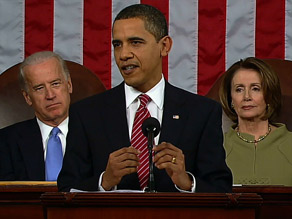
Last night President Obama gave his first State of the Nation address to congress. One of the three areas his administration will invest in to secure our nation is education.
In a global economy, where the most valuable skill you can sell is your knowledge, a good education is no longer just a pathway to opportunity. It is a prerequisite....So tonight I ask every American to commit to at least one year or more of higher education or career training. This can be a community college or a four-year school, vocational training or an apprenticeship. But whatever the training may be, every American will need to get more than a high school diploma.
This is good news to me because this means that there is a place for me and the work I want to do. My challenge is now finding how I fit in.