Showing posts with label instructional methods. Show all posts

Apr 23, 2009

Performance Learning Filter

Today I watched a webinar presented by Allen Interactions on Performance Learning Filters.

Typically, there are three types of training.

Information & Awareness training courses just provide suface content. Its purpose is to transfer knowledge. But with more effort, training can extend deeper to teach learners how to apply the knowledge and to ultimately increast performance by fostering behavior change.

The Performance Learning Filter, when applied, can move a training course from the surface level Information & Awareness level down to further, more performance-driven levels.


  • Context - The content must be presented in the same way that the learner will be expected to act upon it in his/her job.

  • Challenge - The learner must be able to think about the information and apply it on the job.

  • Activity - This is the physical response the learner does to the challenge. Clicking on something with the mouse, dragging one object to another location. The activitydetermines how a learner makes a decision based on the challenge presented.

  • Feedback - The response that is provoded to the learner to show his/her effectiveness to the challenge.


When you are designing a course, ask yourself if it has all four parts of the filter. If it does, then your course moves beyond the surface into more performance-based learning.

View presentation PDF.
View recorded version of webcast.

Mar 12, 2009

Graphic Symbols: The 5th Language

Kevin Thorn, AutoZone, LLC. (personal eLearning blog)

Before I came to this session, I would have said that I only communicate in one language, English.

There are 5 language in which to communicate.
  • Spoken
  • Written - symbolic form of our spoken language
  • Math - symbols for concepts and data
  • Body - language of expression or gesture
  • Graphic - visual language
Look at that! I can now say I can communicate in 5 languages!

Check out all the corporate logos we all know and love. They are all speaking in a language.

Since the beginning of man, communication occurred with graphics. Think cave paintings and Egyptian hieroglyphics. The Mayan culture had their own graphic language (which strangely enough look like iPhone app icons).

Sequential Art: A Graphic medium are images that are used to convey a sequential narrative. Will Eisner believed that comics had teaching potential.

Now, let's all draw some simple shapes... a rectangle, a triangle, a circle. Simple shapes in just the right order, position and size can create recognizable concepts through images.

Images, turned into symbols turned into words. Now, reverse that. Take your spoken language and revert it back to written language and back into picture language.

If you get stuck drawing a concept, break it down into its core components.

Now we're recreating this clown.

Break it down into core components: big nose, crazy hair, big shoes, poofy hair, big smile... Once you focus on the individual elements and not the big picture, then drawing doesn't seem that impossible.

It doesn't need to be perfect or professional, it just needs to convey your message.
Any problem can be make clearer with a picture and any picture can be made using the same simple set of tools and rules. - Dan Roam
Squares, circles, rectangles, lines and dots... all you need to make the world go round.

Reuse your symbols to create new images. With a library of symbols, you can become the master of your own graphic domain.

An object is first a shape, that shape occupies a space, that space defines the object. An object is a shape that occupies a space.

Take a glass:

And break it down into basic shapes: a warped rectangle and a squished circle. It's not really that hard.

It's time to build a better taco! (you had to be there)

Great session, Kevin!

Mar 11, 2009

ID Zone: Storytelling in eLearning

You are a natural born storyteller! Every time you tell a joke, relate an incident, explain facts & figures, talk about your childhood, recreate the steps in a task... See, you can do it.

How does storytelling relate to eLearning?
For design:
  • confirm what to cover (objectives)
  • decide how to cover it (design)
For content:
  • using scenarios
For motivation & evaluation
  • sell the course to futures learners (WIIFM)
  • learn how peiple are using the couse in real life
Stories and scenarios can be used interchangeably. Scenarios are real-file stories with a purpose. A really good story can become a really good scenario.

Nonfiction stories in eLearning
Those stories are captured from direct observation or interviews. These are true events. Nonfiction stories can put the learning into context for the learner and make the resulting training more relevant.

Fiction stories
They may be based on real-life scenarios. Often a composite of many experiences. They can be used as cautionary tales or to model exemplary behavior.

So, let's create a story...

First, let's create an objective.
Demonstrate a useful, non-traditional way to use a toothbrush.

A good story contains:
  • facts
  • situation
  • characters
  • plot (conflict)
  • resolution (ending)
Next, the facts:
Who does this? Define the user categories.
What are their goals?
There are many useful ways to get more from life from a used toothbrush.

Where does this happen and in what circumstance?
You can reuse an old toothbrush at home, at work, for cleaning, or other creative projects.

Characters really bring the story to life.
Personas represent characters' similarities and differences. Personas are composites of user analysis and turning it into a particular character. Also a user profile. They're not one real person, not a sterotype but an archetype, and not your average joe. They have specific properties.
They include:
  • name/picture
  • job title
  • demographics
  • goals and tasks in relation to the subject
  • environment
  • a quote that sums up what matters most to the persona.
If you have a persona for your characters, they can be developed more 'realisticly'. Now, where can you find the domographic info to develop your characters? Think creatively. Customer profiles, Department of Labor statistics, direct observation.

Now, what's the conflict?
BAck to our example. Kathy, our character is having trouble keeping the areas of her sink clean.

The resolution?
Kathy heard from a friend that a toothbrush could help.

Now yout can take that, put it all together, and you can build a scenario that is more robust. Remember elementary school? A scenario is really a story problem.

Change the persona, and the whole scenario changes. Instead of grandma Kathy, how about Paris Hilton or MacGyver?

Go and have fun. How can you use it in your design, in your content and in your evaluation?

Situation Based Learning Design

Situation-Based Learning Design: Research Insights for Enhanced Remembering and Performance
Will Thalheimer, willatworklearning.com

It's just about standing room only in Will's session. Glad I came early and swiped a chair next to a power outlet. These seats are scarce!

It's important to create metaphors that are understandable by "real people".

This session is to share the evolution of the concept of "situation-based learning".

Goal for eLearning designer:
  • get learners to act differerntly
  • to perform far-reaching tasks
  • to retrieve the information they need to apply what was learned
How we Learn / Encode
  • an environmental cue can trigger a memory
  • our mind searches the information
  • from rehearsal, we apply the knowledge
If learners don't access the information (application need) soon enough after training, it becomes difficult to impossible to retrieve.

Retrieval = Learning - Forgetting + Spontaneous Remembering.
Don't forget the forgetting factor. Include opportunities for learners to retrieve the information in regular intervals otherwise the learning is lost.

Situation-based learning begins with the magic question: "What do we want out learners to be able to do and in what situations do we want our learners to do those things?"

SEDA - Real-world application process to situation-based learning
  1. Situation
  2. Evaluation
  3. Decide
  4. Action
Having a goal by itself is not enough to perform an action. If you have an intention, then the action is more likely to take place.

The problem is presenting concepts without providing practice. This turns into a test of memorization. Or provide decisions with no actions. Or provide inadequate evaluations of situations. Or offer a decision without proving the proper situation to apply. All bad and doesn't provide adequate results.

All steps must be followed through to allow the learner to retrieve the knowedlge at the appropriate time.

We absorb more than just the learning message. It's the learning message and background stimuli (noise, sights, smells, emotions, etc.). When it comes down to retrieving the information, memories of background stimuli can also trigger the retreival event. Multiple cues (triggers) improve the retreival results.

A practical example: you're in the kitchen and remember to get something out of the living room. You go to the living room and forget want you needed. So you go back to the kitchen and remember what you needed in the living room. Your background stimulus (location) triggered the memory.

Move from topic-based to situation-based design. By aligning the situational cues to real-world events, the retrieval is more effective.

Summary
  • By aligning contexts, we can create spontaneous remembering
  • Start designing differently - based on what learners should DO and not KNOW
  • Benefits = more remembering, better results

Mar 10, 2009

Designing Scenario-based eLearning

Today was the first day of the eLearning Guild's Annual Gathering 2009. I took the Designing Scenario-based eLearning certificate program.

Tom Eucker, a colleague of Ruth Clark started off talking about his experience, then brought up this statistic:
The US spent $134 Billion on training in 2007! (ASTD: 2008 report) Most of that (62.2%) is salaries, development, admin, etc. Classroom training has been leading the charge, but technology is rapidly gaining ground. Most of the technology has been self-study. But classroom will never go away. There's always the human element that people like to be around other people to get their perspective. Most relevant in complex and deep topics.

Info
  • Inform: to present information
  • Perform: to build skills
    • near transfer - the training is similar to real life; precedural; routine tasks
    • far transfer - learn a generic ability, but it can be applied to different situations; strategic skills; problem solving
Scenario-based learning is geared for far transfer learning.
There is a shift happening from near-transfer to far-transfer situations. Routine tasks are being done by machines. Workers are being asked to do more problem-solving, troubleshooting tasks.

Three course architectures:
  1. Receptive
    • sit back and absorb
    • lecture; video documentary
    • best to inform learners.
    • appropriate for anyone
  2. Directive
    • bottom up; short lessons
    • rule/example/practice + feedback
    • most software training is directive
    • best for near-transfer goals
    • appropriate for novices
  3. Guided Discovery
    • problem-centered
    • inductive approach
    • scenario-based learning
    • best for far-transfer goals
    • best for learners who have some prior knowledge


Three views of learning
  1. Transmisssion
    • absorbtion teaching view
    • Receptive
  2. Behavioral
    • instructive teaching view (provide examples & drill)
    • directive
  3. Knowledge construction
    • inductive teaching view
    • guided discovery
    • provide learners with the skill to create their own connections in their head so they can recreate the correct response later on.


Three levels of knowledge:
  • explicit (stuff you can read in a book, take a class, etc)
  • implicit (learn by doing; the experts know the problems that novices won't know. Basis for scenario based learning)
  • tacit (subconscionous knowledge where the person doesn't know how he knows)
SBL & Architectures
  • Directive
    • Guidelines -> examples -> scenario
  • Guided discovery
    • scenario -> derive guilelines


Experiential Learning
  1. Experience (provide examples) [inductive approach: 1+2] SBL
  2. Process (develop rules)
  3. Generalize (create rules & examples) [deductive approach: 3+4]
  4. Apply (do it)
SBL Synonyms
  • problem based
  • goal based
  • scenario based
  • cognative apprenticeships
  • games / simulations
  • cased based
  • experiential
  • challenge based
  • role play
  • interactive storytelling


Key Features of SBL
  • evident problem / trigger event / job assignment
  • lessons provide case/background information
  • manage flounder (of content, not technology) with guidance (let them go down the wrong track for only a short time)
  • access to knowledge and skills (experts, consultants)
  • feedback provided
    • intrinsic - the result of decision making built into the scenario
    • instructional - popup text to work the scenario
  • time compression
  • mistakes are ok - you learn more from the mistakes you make rather than the successes you achieve.
  • holistic vs. linear (choose your own adventure)
  • inductive vs. instructive
  • opportunities for reflection
Design Features (posted separately at tinyurl.com/ag09-p1 )
  1. Begin with an authentic job problem
    1. job specific
    2. linkd to learnign objectives
    3. designed at the right level of complexity
    4. incorporates procedure, knowledge and starategic elements of the job
  2. provide acces to case related info
    1. job realistic
    2. easy to find and access
    3. reflect normal job sources
    4. linked to case objectives
  3. manage flounder factor
    1. closed (more guidance) vs. open (many choices) design
    2. simple to complex problems (give them feeling of success to start)
    3. provide guidance
      1. instructor
      2. collaborative groups
      3. model solutions
      4. worksheets
      5. pedagogical agents
  4. provide access to knowledge and skills
    1. traditional tutorials
    2. online experts
    3. links to docs and presentations
    4. examples and models of best practices
    5. email to instructor/coach (to get to the tacit knowledge that can't come from the training)
  5. plan scenario feedback
    1. peer comparisons
    2. model answers
    3. intrinsic-consequential
    4. instructional
    5. expert review & comments
Differences between text, video and animation in learning
  • Animation / Video returned higher test scores in application test and their satisfaction
  • so long as the animation/video has a distinct purpose.
THere's a balance to the complexity of a SBL
  • narrow scope / broad scope
  • directive architecture / guided discovery
  • problems as a trigger to thinking / problems as enging
  • low-end media (text/graphics) / video; animations
  • behaviorial task analysis / cognitive task analysis
  • branched scenarios / open simulation
  • defined outcomes / variable outcomes
  • instructor lead training / e-learning
Design Plan for SBL
  1. task deliverable (learning objective)
    1. what is the desired final outcome
  2. trigger event
    1. what initiates the problem? What's the storyline to start it?
  3. case data (givens)
    1. what kind of data will be provided
    2. where is it located
  4. feedback
    1. intrinsic
    2. instructional
  5. reflection opportunity
    1. process comparison
    2. rationally comparison
    3. feedback - replay
Program Design
  • Branched scenario
    • closed design (fixed set of decisions and responses)
    • choose your own adventure
    • good for linear scenarios
  • MEnu
    • list (navigation) of all elements available to the learner
    • non-linear
  • Full simulation
    • open design
    • sequence doesn't matter
    • simulation engine determines situations and outcomes
  • Virtual World (Second Life)
    • open ended

Jan 7, 2009

War Games

The NBC Nightly news ran this story about an Army recruiting site in the Franklin Mills Mall in Philadelphia, PA. But it's not your typical recruitment center. It's a place where people can play video games -- war simulation games -- to experience the front lines of an Army unit in a war zone.


As a marketing tool, I think it's brilliant. It targets young adults who are into video games. The facility has cutting-edge technology and is pretty much an opportunity to 'try before you buy'.

As a learning tool, I also think it has many of the characteristics mentioned in my previous post:
  • Personalized and goal based - Individuals are part of a team to accomplish a mission. This parallels the goals and missions defined by military units.
  • Coaching and immediate feedback - I'm not sure if there is coaching, but there is definitely immediate feedback based on the learner's actions. You can see if your shot was on target, or if you are not careful and get killed.
  • Flexibility - The outcome of the simulation is based on the learner's actions. The simulation will be different each time it is used. Just as in combat, a soldiers actions have consequences and they must learn how to act and at what appropriate time.
  • Simple, intuitive navigation - There isn't time to sit down and read the instructions. Just like in combat, learners must be able to hit the ground running.
  • Hard fun - Because it is a simulation, learners have the chance to make mistakes, see the outcome, overcome challenges and try again.
What are your thoughts about the Army Experience? Do you see the learning value is these simulations and video games?

Sep 3, 2008

Scenario-go-round

Compliance courses rarely have learners lined up for hours for the opportunity to enroll in them. In most cases, learners take these courses not because they want to, but because they have to. Intrinsic motivation versus external enforcers.

There is information that the company feels is important for the learner to get from the course, so one option may be to provide the content in a linear presentation format. However, because the information does not satisfy an immediate need for the learner, it may be difficult to really learn from it.

An alternative is to present situations where the learner will use the knowledge and skills of the course in real-life scenarios. By getting the learner to think and make decisions will help process the information and integrate it into their knowledge base.

Tom Kuhlmann presents three questions that he asks before building scenarios for training programs.
  • What situations require the learner to know this information?
    By putting learners in real-life situations, they will be able to apply it to their work more easily.

  • What choices could they be expected to make in that circumstance?
    The choices offered should be real and not so obvious. My making the learner stop and think about their actions, that increases the value of the training. 

  • What are the consequences of those choices?
  • You could provide very concrete feedback statements. Or, you could continue building the scenario on top of the learners' choices. In many situations, there isn't a direct cause-effect relationship, but a domino effect where small deviations can combine into a larger result.

Aug 1, 2008

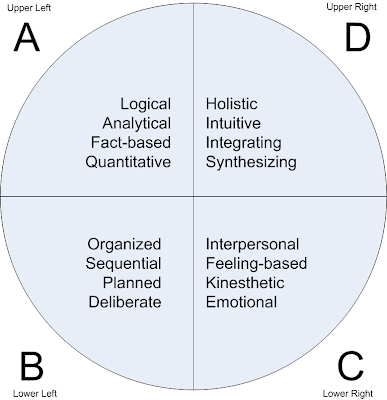
The Whole Brain Model

"We do not see things as they are, we see things as we are" - The Talmud

Have you noticed that people learn things in different ways? For example, I am a visual learner. I need to see an illustration, photo, or video of something to understand how it works. Someone else might just be able to read a description to understand it. And another person needs to be able to manipulate it before it makes sense to her.

This relates to the concept of Multiple Intelligences and it shows that people have unique learning styles. Courses need to evolve from one-dimensional presentations to a more flexible style that can really reach a broader audience of learners.

The Whole Brain Model
The Whole Brain Model is based on the concept that our different modes of learning are distributed among the four quadrants of the brain. Each quadrant is focused on specific thinking processes. However while you may be stronger in one of the quadrants (I fluctuate between A and D), you have some degree of all quadrant traits in you.


These connections between the four quadrants are there, but they may be weak. So when faced with a learning method that is not a learner's dominant style, there may be uncomfortable, unpracticed or frustrating experiences. On the other end of the spectrum, if you cater only to the dominant learning style, then there is less of a challenge and the training becomes boring.

The idea is to find that balance between boring the learner and anxiety.


Source: Biech, E. (Ed.). (2008). ASTD handbook for workplace learning professionals. Alexandria, VA: ASTD Press.

Teach them how to think, rather than do

Telling ain't training. It's been said before many times. Yet, many courses still take the approach of 'just tell them what they need to know'.

Well, Cathy Moore brings up a good point when she says "It’s easiest to just tell them what to do, but what we need to do is to teach them how to think."

Adult learners want to know that the time they invest in training will be immediately valuable to their job. Part of accomplishing that is to present scenarios that do not portray solid black-or-white instances. Let there be some ambiguity, because that's what real life is, right?

Remember, the goal of training is to change behavior. So give learners a chance to make decisions and then show the results of those decisions. Not all of them will be the correct ones, but by understanding why it was incorrect and how to improve upon it will be more effective than just clicking through multiple choice quizzes.

Jul 2, 2008

Measurement Job Aid

As a follow up to my last post, I found a handy 1 page job aid that helps in determining if the measurement tool in an eLearning course is as good as it can be.

Jun 5, 2008

Telling Ain't Training

An interesting article from Adobe brings up the question "How do you know that they know?".
Typically at the end of a course where the learner is given a wealth of information, the method for assessing any knowledge gained is by going through a multiple choice test. But just because they can answer questions correctly, does that really mean that they can perform correctly?
Frank Nguyen provides 5 steps to developing an eLearning assessment process:
  1. Identify instructional objectives
  2. Categorize objectives
  3. Select appropriate assessment
  4. Draft assessment items
  5. Develop assessment items

Categorize Instructional Objectives

Instructional objectives can be put into 5 categories: fact, concept, process, procedure and principles.


Select Appropriate Assessment
Based on the five different instructional objectives categories, you can use several assessment methods. The table below lists recommended and possible assessment methods.


Granted, the selling point for this article was to use Adobe Captivate, but the information is valid and very valuable.

Compliance 2.0

I got the idea for my 'Compliance 2.0' Lunch 'N Learn session from a webinar called "Compliance Training: Going Beyond the Check-it-off-the-list Approach".
The main theme here is when the primary goal becomes checking compliance training off the HR's to-do list, then the focus is on the delivery of training, not the behavior change needed to become compliant.
In my presentation I listed 4 points:
  1. Context is king
  2. Develop relevant content from business goals
  3. Answer the 'what's in it for me' for the learner
  4. Behavior change = Action learning

I will put my presentation online soon, but you can see the recorded webinar from the eLearn Campus website. You will need to register, but its free.